
✅ Beta available · Free during beta · macOS 26+ · One-time price after beta

Klabauter. Your little kobold for the project graveyard.

Klabauter finds your dormant projects — locally and on GitHub —, scores them with an AI-powered Gem Score, and gets you back in with exactly one next action. Revive the good ideas. Archive the ballast. Finally.

Dogfood receipts: ~200 local repos · ~900 GitHub repos · 1 Kobold how I work →

What is Klabauter

Klabauter is a macOS menu-bar app for your project graveyard.

It scans your watch folders for Git repos, scores every dormant project with AI, and helps you revive the good ideas — while getting rid of the remaining ballast. Locally and remotely: your full GitHub inventory is built in. You choose the AI endpoint; every score stays on your Mac in the open .pumuckl format.

What Klabauter can do today.

Dogfooded on ~1,100 real projects.

Scan the project graveyard

Klabauter incrementally scans your watch folders for Git repos — and your entire GitHub account via the gh CLI. One scan button chains the Git scan and the AI triage. Remote-only repos: clone, archive, or delete, right from the table.

AI triage with Gem Score

The funnel: Discovered → Scored → Deep. Pipeline CTAs tell you what's pending, what it costs (ETA) — and get it done at the click of a button. You choose the AI endpoint: kimi acp by default, any OpenAI-compatible endpoint, or DeepSeek via jcode.

Re-Entry Cockpit

Per project: a hero with the single next action — plus four radars: Maturity (features, code, tests, docs, design, release), Idea × Problem, Business, and Architecture with a layer diagram.

Resonance dashboard

Finds semantic duplicates, merge candidates, and synergies across your whole portfolio — with an AI verdict, a merge plan, and bulk actions. Three half projects become one whole.

How Klabauter works in your day.

One kobold, one funnel, one clear next step.

01 Scan

The workbench — a triage funnel

One scan button (Git→triage chained), clickable names and commits (→ GitHub), origin badges (own/org/fork), public/private locks, favorites 🧌 (1–5), a parked filter, and a source filter Local/GitHub/All. The funnel shows what's pending per stage — including ETA.

Example
Scan → 217 repos found
Funnel: Discovered 217 → Scored 84 → Deep 12
"133 projects waiting for triage — ~40 min runtime"
[Click] → triage runs, Gem Scores trickle in
02 Cockpit

Re-Entry Cockpit — the one next action

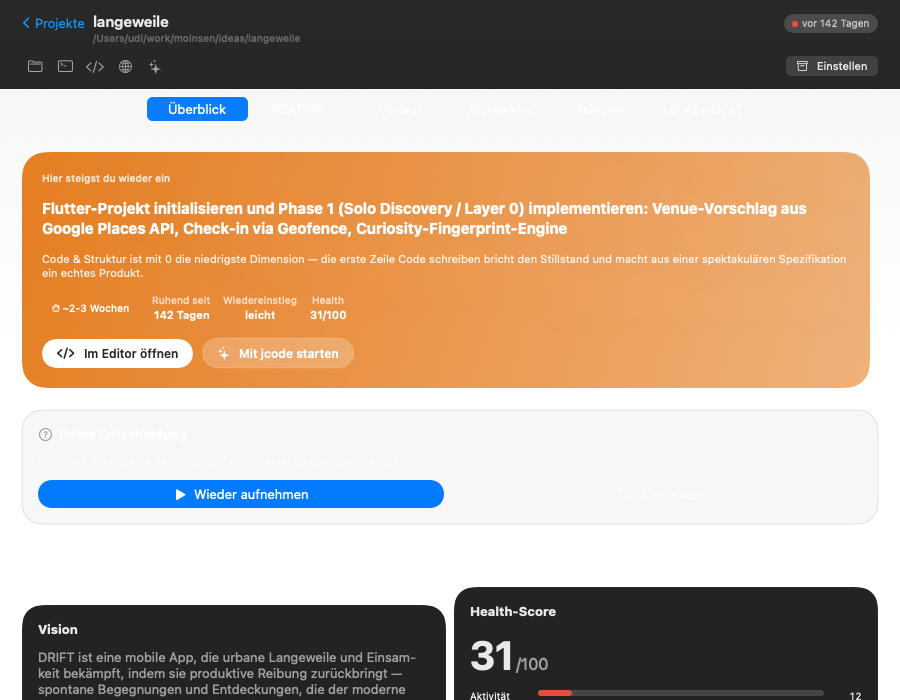
Every project gets a cockpit with five tabs: Overview (hero, setup check, maturity radar), Potential (idea/problem radars), Tech (architecture map with layer diagram, implementation audit), Business (radar + demand verdict), and Launch (landing URL + marketing strategy with market signals). One full-analysis button orchestrates all five analyses.

Klabauter Re-Entry Cockpit: hero with next action and scoring radars
Example
Hero: "README missing — it costs you every re-entry"
[Next action: generate README]
Radar: Maturity 4/6 · Idea 5/6 · Business 3/6 · Setup check 🟢
03 Resonance

Resonances — find duplicates, merge synergies

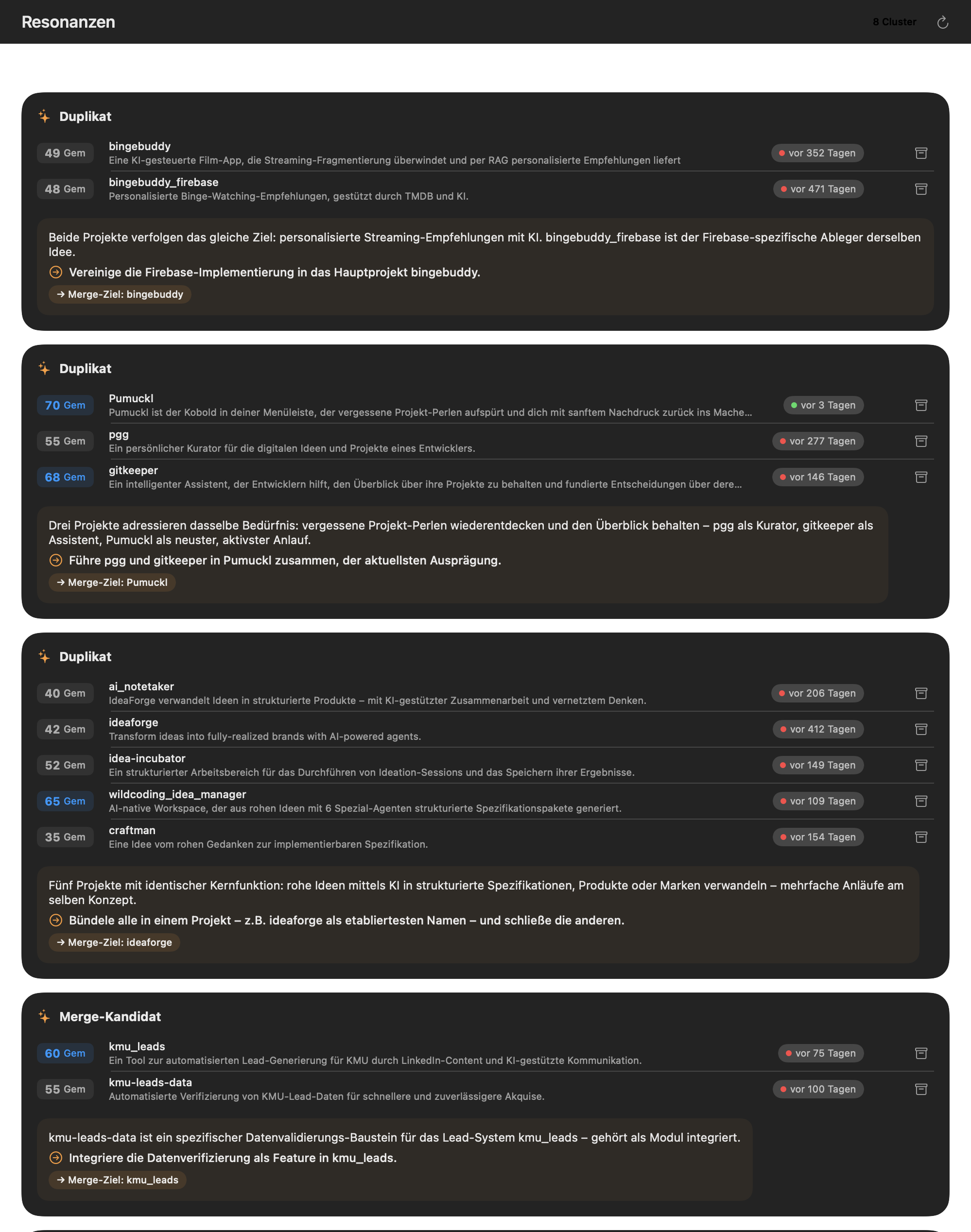
LLM clustering across the whole portfolio: semantic duplicates, merge candidates, synergies. Cluster details with an AI verdict and a concrete merge plan. Bulk-park the ballast, ignore the false alarms.

Klabauter resonance dashboard: semantic duplicates and merge candidates
Example
Cluster "landing generator" (3 projects, 82% similarity)
AI verdict: "B has the better architecture, A the better idea"
Merge plan: 5 steps · [Bulk: park 2]
04 Lifecycle

Park · Archive · Delete — local & remote

Parking is reversible. Archiving archives on GitHub AND moves the repo into _Archive/ locally. Deleting requires typing the project name as a guard. Works for local repos just as for the remote repos in the GitHub inventory — remote-only repos can be cloned, archived, or deleted without ever having existed locally.

Example
47 projects parked · 31 archived · 9 deleted
"Delete repo-x? Type to confirm: repo-x"
→ gone. Locally AND remotely.
05 ⌘⇧M

Finds — links that find their projects

⌘⇧M captures links and notes from anywhere. On-device embeddings (Apple NaturalLanguage) match every find against your projects — none of it leaves your Mac. The article from three weeks ago lands next to the right dormant project.

Example
⌘⇧M → "Great pricing-page pattern: …"
→ Match: saas-landing (91%) · shop-redesign (74%)
[The next morning greeting takes it into account]
06 ☀️

Morning greeting — the one project worth it today

Every morning, one notification with a single recommendation — learned from your engagement: what you open, what you dismiss, what you actually keep building. Rekindled tracking celebrates when dormant projects see fresh commits: "🔥 3 alive again".

Example
☀️ Klabauter: "Today klabauter-landing is worth it —
3 finds waiting, setup check 🟢, 2h is enough"
[Open] [Not today] → the kobold learns.

Built different.

Three decisions we won't roll back.

01

You choose the AI endpoint

Klabauter is NOT 100% local — and we'd rather say that out loud: for scoring, project context (README, manifest, git-log summary) goes to an AI endpoint. Which one is your call: kimi acp (Moonshot) by default, alternatively any OpenAI-compatible endpoint or DeepSeek via jcode. What stays local: all scores and reports (open cache in .pumuckl per repo), your finds and their embeddings (on-device). No telemetry, no accounts — and no server of ours in between.

Full data-flow map →

02

Mac-native by design

Klabauter sits deep in macOS 26: Swift 6 with strict concurrency, SwiftUI MenuBarExtra with Liquid Glass, NaturalLanguage embeddings on-device, zero-dependency SQLite. Cross-platform would lose this depth — and with it the entire advantage. Mac-only isn't a limitation, it's the precondition for how closely Klabauter works with your system.

Why mac-only forever →
03

Open format by design

Everything Klabauter knows about your projects lives as a .pumuckl file right inside the repo: scores, reports, stamps, favorites, rekindled markers. Readable for you, diffable in Git — and the bundled Claude Code plugin works on the same format. No lock-in, no proprietary silo.

What else is honest →

The vision

An end to project graveyards.

Every good idea deserves a second life.

I have ~200 local repos and ~900 on GitHub. Decades of ideas, half-finished SaaS products, weekend experiments. My gut says: there are gems in there. Reality says: I can't find them again. Klabauter is my answer — built against my own graveyard, verified on every single one of those repos.

What Klabauter aims to replace

Mental "someday" list

Project overview

brain tax

GitHub archive jungle

Remote ballast

grows forever

Note-app link graveyard

Finds

orphaned

Spreadsheet inventory

Portfolio tracking

DIY

Gut-feel triage

What's worth it?

usually wrong

What Klabauter does today

  • Scan + triage funnel: watch folders and full GitHub inventory, Discovered → Scored → Deep, with Gem Score
  • Re-Entry Cockpit: the one next action plus four radars — maturity, idea×problem, business, architecture
  • Resonance dashboard: semantic duplicates, merge candidates, synergies across the portfolio
  • Lifecycle local + remote: park, archive (GitHub + _Archive/), delete with guard
  • Finds (⌘⇧M) with on-device embeddings and a morning greeting with engagement learning

On the way

  • Release 1.0: LaunchAgent installation and final polish
  • Portfolio aggregate of dimensions: "tests are weak everywhere" as its own signal
  • Deeper multi-turn analyses: ACP sessions with context across turns
  • macOS 27 APIs once final — the floor stays macOS 26
  • Whatever the issue tracker yells loudest about

End of the song: a kobold that knows your graveyard like its own pocket — and reminds you every morning of the one idea that's due today. The good projects come back, the ballast finally leaves. If you get in now, your kobold grows with you.

Three steps in.

01

Install

Grab the DMG, drag the app to Applications. Signed (Developer ID) and notarized — no Gatekeeper dance. Klabauter now lives in your menu bar.

02

Scan watch folders

Point Klabauter at your project folders and connect GitHub (uses your existing gh login). One scan later you see your graveyard in full for the first time.

03

Clean up & revive

Run triage, read the cockpits, revive good ideas with their next action — park, archive, or delete the rest. Free during beta, one-time price afterwards.

Built clean.

You pick the AI Configurable endpoint
Privacy First No telemetry, no accounts
Free beta One-time price after beta
macOS Native Swift 6, signed, notarized

You're not buying a snapshot.

You're buying the trajectory.

Klabauter is my daily driver — it has fully scanned and triaged my ~200 local and ~900 remote projects, and for the first time in years my graveyard is moving again. Every friction that annoys me, I fix. You join free during beta — and benefit from me eating my own dog food.

Ulrich Diedrichsen, Solo-Dev aus Hamburg · GitHub

What's coming next

  • Release 1.0 with LaunchAgent installation
  • Portfolio aggregate: systemic weaknesses across the whole portfolio
  • Multi-turn analyses with session context
  • Whatever the issue tracker yells loudest about

Feature request? Bug? Question?

Open it on GitHub

Klabauter isn't currently open source — the source repo stays private for now. Issues and feature requests there are the direct line to the roadmap.

Beta available now.

Klabauter runs as a free beta. Signed (Developer ID) and notarized by Apple — download, drag to Applications, scan the graveyard.

Beta · macOS 26+ · signed & notarized

Free during beta · No subscription · No telemetry · One-time price after beta